Recap
Recap the visit by voice or text. Leave out patient identifiers.
Made for home-health clinicians.
Turn your visit recap into a clear clinical draft with CareDraft AI.
AndroidApple · iOS
Meet CareDraft AI
Custom AI for physical, occupational, and speech therapy and skilled nursing. Use a narrative or your own note template.
See it in action
01 / Your quick recap
“PT f/u. Pt reports easier chair transfers, still unsteady with turns. Gait w RW, CGA; better foot clearance after cues. Practiced sit-to-stand, less UE push-off. Continue skilled gait/balance work per POC.”
02 / Your note, organized
Draft for reviewPhysical therapy · routine visit
The patient was seen for a physical therapy follow-up visit and reports easier chair transfers, though they remain unsteady with turns. Gait was observed with a rolling walker, requiring contact guard assist, with improved foot clearance following cues. Skilled intervention included sit-to-stand practice, noting decreased upper extremity push-off. Continued skilled physical therapy is indicated to progress gait and balance work as outlined in the plan of care.
Generated by CareDraft AI
Actual, unedited AI output.†
How it works
Recap the visit by voice or text. Leave out patient identifiers.
Let CareDraft AI organize your recap.
Check the facts, numbers, and medications. Edit before approving.
Share text or a PDF with your approved destination.
The visit toolkit
From take-home plans to the drive between visits.
Build a program with illustrated exercises and clear patient instructions.
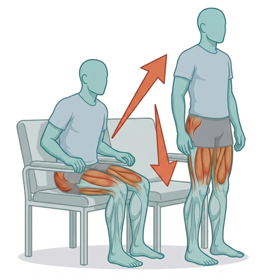
Sit to Stand
3 sets × 10 reps · daily
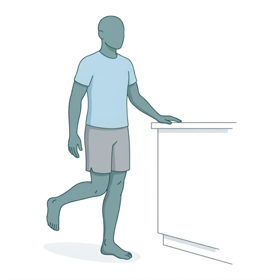
Single Leg Stance
3 × 30 sec holds · at counter
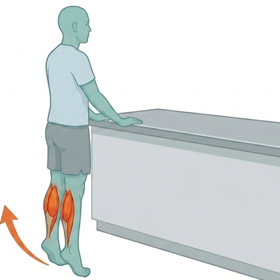
Standing Heel Raises
2 sets × 15 reps · daily
Turn a medication photo into an editable list.
Lisinopril
10 mg · once daily · oral
Metformin
500 mg · twice daily · with meals
Apixaban
5 mg · twice daily · oral
Arrange your visits, open your route, and keep track of the miles.
Bring plain-language education together in one patient handout.
Your take-home guide
Everyday safety reminders
A safer space for daily activities
Pacing and planning your day
Keep trips and vehicle expenses organized throughout the month.
Illustrative previews with sample content.
Recurring AI fee‡
No subscription or per-note charges.
Security
AI drafting stays on your phone. Saved records are encrypted.
Notes are drafted on your phone, not by a cloud AI service. Android dictation may use your phone's online speech service.
Use a PIN or biometric unlock. Keep your recovery code somewhere safe.
Choose your export destination and connected-tool settings.
The details
Devices, privacy, and what happens under the hood.
CareDraft supports Android and Apple (iOS). On-device AI needs a phone with 8 GB of memory, such as an iPhone 15 Pro or newer, a Galaxy S23 or newer, or a Pixel 8 Pro, Pixel 9 or newer, plus room for the one-time 3.4 GB model download. Drafting speed depends on your device and the model you choose. See Support for details.
After the model download, AI note drafting runs offline. You can also type notes and use local records without a connection. Offline dictation depends on your phone having offline speech recognition available. Address suggestions and external map services need their own connections.
The note examples are actual, unedited CareDraft AI output from sample visit recaps; the phone preview shows an excerpt. Results vary, and all AI output is a draft for clinician review. AI can misinterpret shorthand or introduce errors. Compare each draft with your recap and verify every clinical fact, number, side, medication, and plan. These examples show drafting behavior, not complete documentation templates. Use de-identified recaps and follow your organization’s requirements.
The $0 monthly amount refers to recurring AI fees. There is no AI subscription or per-note charge. CareDraft is free to download, and AI drafting is free for 7 days. After that, a one-time $19.99 unlock keeps AI drafting; everything else in the app stays free.
CareDraft uses your device's configured speech-recognition service. With offline recognition available, it can transcribe locally; on Android, the selected provider may use network processing depending on your settings. CareDraft LLC does not receive the audio or transcript. The CareDraft model drafts the note on your phone.
CareDraft doesn't claim HIPAA compliance. CareDraft LLC isn't a HIPAA business associate and doesn't sign business associate agreements, because your dictations and notes never reach us. CareDraft is intended for de-identified, post-encounter drafting. Local processing and encryption do not by themselves establish that a workflow meets your organization's requirements. Check with your organization before using it for clinical work, and read the Privacy Policy and Terms of Use.
CareDraft E2B is a roughly 3.4 GB download, with 8 GB phone RAM minimum and 12 GB comfortable. CareDraft E4B is roughly 5.3 GB, with 12 GB phone RAM recommended. Allow room for the download and your saved records. Performance depends on available memory, device, and note length.
CareDraft E2B and E4B are our own fine-tuned versions of Google's Gemma models. Fine-tuning means giving an AI additional training for a specific job — in this case, organizing home-health dictation into clinical notes. They run on your phone after download. This focused training does not guarantee accuracy; every draft still needs clinician review.
We plan to keep improving CareDraft's AI models, with a focus on note quality, reliability, and performance on your phone. Every draft will still need your review and approval.
Our downloadable models were trained on synthetic examples: fictional home-health visit dictations paired with example notes. These cover physical therapy, occupational therapy, speech therapy, and skilled nursing. Your notes and dictation are not collected to train these models.
Saved notes, transcripts, and recordings use AES-256-GCM encryption. Your PIN protects the encryption key through PBKDF2-HMAC-SHA512 key derivation, with biometric unlock supported. CareDraft does not operate a clinical-content backend or keep a server backup of your notes. Save your recovery code: losing both it and your PIN means your data cannot be recovered.
Initial model downloads require a connection. Dictation uses your device’s speech service and may be processed online, depending on your provider and settings. Online address suggestions start off. If you enable them, your typed search and search area go to Photon (Komoot). Manual entry works offline. Opening a route shares it with your chosen maps app. Exports go to the destination you select.
No account is required for note drafting. CareDraft has no advertising trackers, and your notes and dictation are not collected to train its AI models. Android photo-to-text processes images on-device, but its Google ML Kit SDK sends technical usage and diagnostic data to Google. See the Privacy Policy for details.
Use the recovery code you saved at setup to unlock and set a new PIN. If you lose both the PIN and the recovery code, your data is unrecoverable — we hold no keys and no copies, so there's no master unlock. Keep that code somewhere safe.
CareDraft for home health
Coming soon for Android and iPhone
Explore CareDraft AIBuilt by a practicing home-health clinician.